
ISP software connects billing with the subscriber lifecycle
An internet service provider repeats the same operating cycle every month: onboard subscribers, assign packages, generate bills, collect payments, follow up dues, update service status, resolve support issues and monitor the network. When these activities are split across spreadsheets, messaging apps and network tools, customer and collection information becomes difficult to reconcile.
A well-designed ISP management system creates a single operational layer for customer, billing and service information while integrating with network tools where the technical environment supports it.
What the real ISP interface shows
The current Software Solution Company ISP system includes dashboard and monitoring views that demonstrate the type of information an operator may need in day-to-day work.
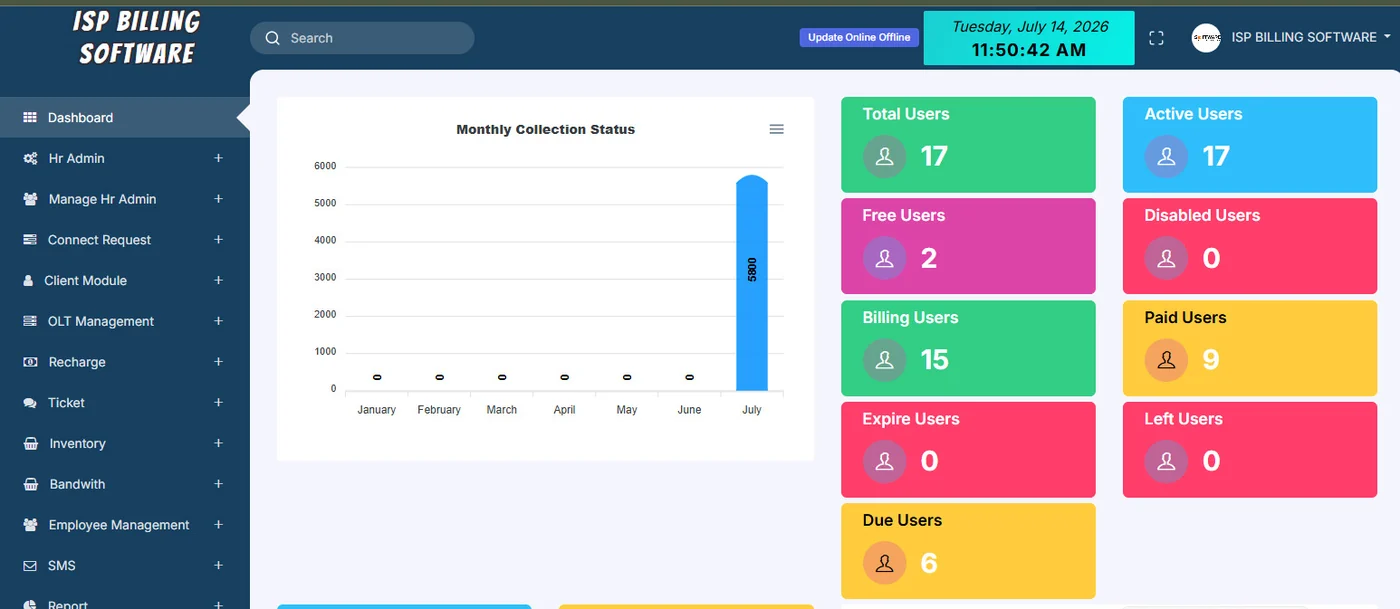
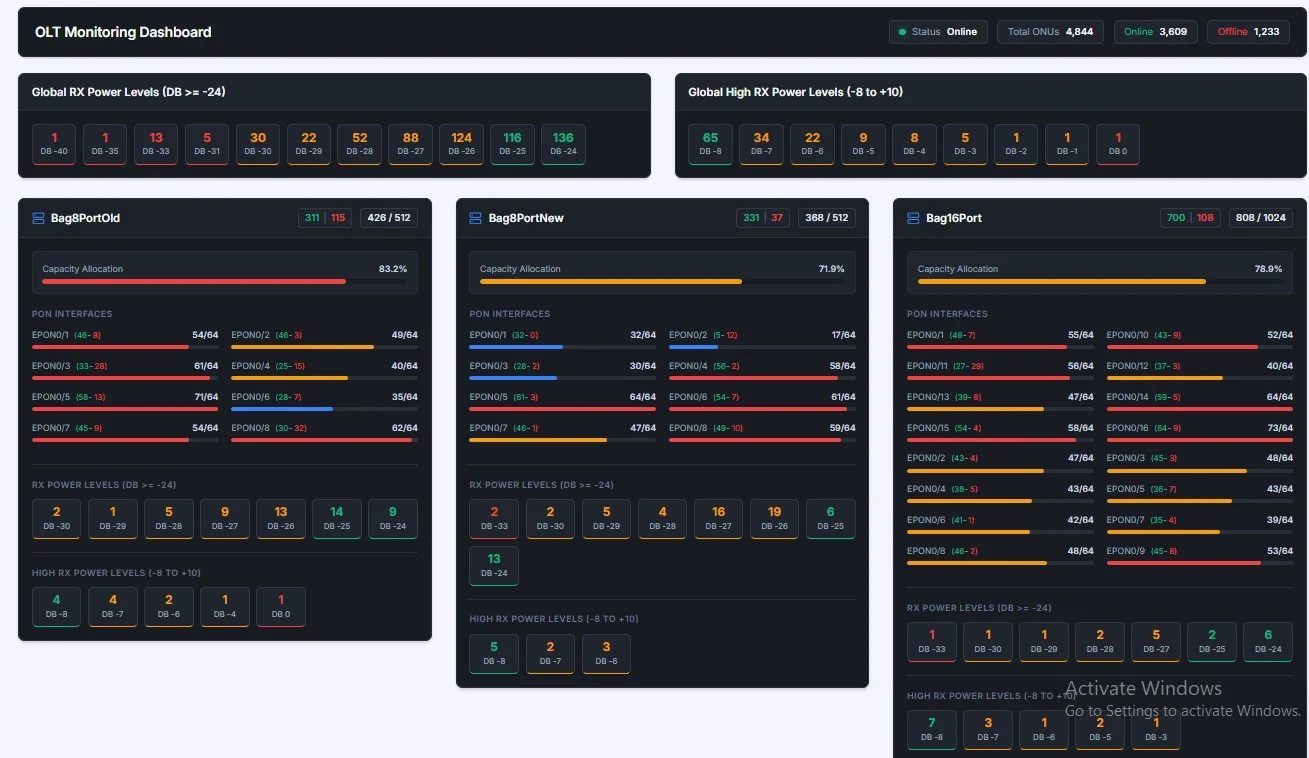
These screens are useful because they connect commercial information—such as monthly bills, collections and dues—with operational views such as subscriber status and network monitoring.
Core modules an ISP should evaluate
Customer ID, contact details, address/area, package, service status and related operational information.
Generate monthly billing records based on configured packages and customer rules.
Track payments, outstanding amounts, collection history and customer ledger information.
Maintain active, free, billing, disabled, expired, left or other operational states according to the configured process.
Where integrated, monitor OLT/port capacity, ONU online/offline state and optical signal indicators.
Connect customer complaints or service requests to the subscriber record.
Track devices, network items or other inventory relevant to subscriber installations and operations.
Separate access for administration, billing/accounts, support or technical teams and provide management reports.
A typical monthly ISP billing workflow
Maintain subscribers. Keep package, area, connection and contact information current.
Generate billing. Create the recurring billing cycle according to configured rules.
Collect & reconcile. Record collections and monitor unpaid or partially paid accounts.
Update service status. Use the approved operating process for active, restricted, expired or disconnected accounts.
Monitor operations. Review subscriber activity, support issues and network indicators.
Review reports. Management follows collection, dues, subscriber growth and operational exceptions.
Billing software and network integration are different layers
A billing platform can maintain subscriber and payment status without directly controlling network equipment. Network integration adds another layer: authentication, service provisioning, bandwidth control or monitoring may connect to MikroTik, OLT platforms or other systems depending on the ISP architecture.
Before buying, document the technical environment: routers, OLT brands/models, authentication method, customer ID conventions, IP/MAC information and any APIs or existing integrations. This prevents a vendor from promising “network integration” without defining what that actually means.
ISP software buying checklist
- Subscriber scale: current and expected subscriber count
- Area/branch structure: how customers and collections are organized
- Package rules: recurring plans, free users, special billing and status logic
- Collection workflow: cash, field collection, bank/mobile payment or other channels
- Network environment: MikroTik, OLT/ONU and authentication/integration requirements
- Support workflow: tickets, complaints and technician access
- Inventory: ONU/router/device tracking requirements
- Reports: bills, collections, dues, customer ledger, user status and operational dashboards
- Roles: admin, accounts, collection, support and network-team permissions
- Migration: customer, package, due and network-identifier data from the current system
How to migrate an ISP billing system safely
Subscriber data is highly operational, so migration needs reconciliation. Clean duplicate customers, confirm package names, map areas, standardize customer IDs and verify opening dues. If network identifiers such as MAC addresses, IP information or ONU data are part of the system, validate their format before import.
Run a controlled comparison before switching the billing cycle. Select a sample of customers across different areas and packages, compare bills and dues between old and new systems, and confirm service-status workflows. Only then move to the full production cycle.
View our ISP Billing Software in Bangladesh page for real screenshots and product-specific details.
Frequently asked questions
What is ISP management software?
ISP management software brings subscriber information, packages, recurring billing, collections, service status, support and operational reporting into a structured workflow. Network-monitoring or control modules may also be integrated depending on the environment.
Can ISP software track active and inactive subscribers?
Yes, subscriber status is a core operational requirement. The exact status workflow can be configured around billing, service and network processes.
Can ISP billing software integrate with MikroTik or network systems?
Integration may be possible depending on the routers, authentication setup, APIs and operating model. The technical environment should be reviewed before the integration scope is confirmed.
What is OLT/ONU monitoring used for?
In fiber networks, OLT/ONU monitoring can help operations teams view device or port status, optical signal information and other network indicators. The exact data available depends on the equipment and integration.
Can an ISP migrate from spreadsheets or another billing system?
Yes, but customer IDs, packages, opening dues, payment history and network identifiers should be cleaned and mapped carefully before migration. A staged validation is safer than moving everything without reconciliation.
Want to see how this works in your business?
Tell us about your current process, users and reporting needs. We can focus the demo or requirement discussion on the workflow that matters to you.